 |
Radical Pie Equation Editor |
Every letter, number, operator, or other type of character appearing in an equation is generically called a symbol. A single symbol structure can consist of one or more adjacent characters having the same role and style. New symbol structures are created automatically as you type. For example, if you were to enter the equation 2xy + 5, then four symbol structures would be created, one for the number 2 with the upright style, one for the letters xy with the italic style, one for the + operator with the upright style, and one for the number 5 with the upright style.
A variety of accents and marks can be applied to a symbol using the marks palette. An accent or mark always applies to a single character, so a multi-character symbol is broken up if necessary when these are inserted.
The properties of a symbol structure can be changed in the Symbol Properties dialog, shown below. This dialog is opened by selecting Properties... from the Edit menu or typing the shortcut Ctrl+P while one or more characters in the symbol structure are selected. (If the insertion caret is inside a symbol, but there is no selection, then the Properties... command applies to the structure to which the group containing the symbol belongs, so there must be a selection to edit the properties of a symbol.)
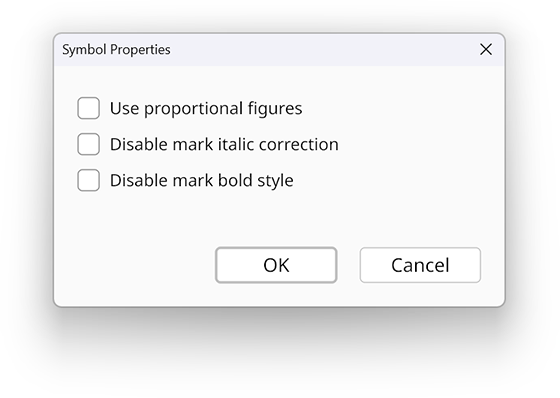
If the Use proportional figures box is checked, then any numbers in the symbol use glyphs in the font that have differing widths, if available. If this box is not checked, which is the default, then numbers use “tabular” glyphs that all have the same width.
If the Apply small caps substitution box is checked, then lowercase letters in the symbol are replaced with small caps alternates if such glyphs are available in the font.
If the Apply capital punctuation forms box is checked, then various punctuation characters in the symbol are replaced with alternates that are better suited for contexts where all letters are capitalized. Not all fonts contain these alternates, and the set of affected characters can vary from font to font.
If the Apply slashed zero alternate box is checked, then the number zero is replaced by a slashed alternate, if one is available in the font.
If the Enable mark italic correction box is checked, then any accents and marks attached to the symbol are shifted to account for the italic slant angle when the symbol uses an italic style.
If the Enable mark bold style box is checked, then any accents and marks attached to the symbol will use a bold style whenever the symbol itself uses a bold style. If this box is not checked, then any marks attached to a symbol having a bold style will be taken from the fonts for the upright non-bold style.